
Wisfig field guide · Practical website and search planning
How to build service-area pages that deserve to exist
By Wisfig · Published
A city name is not enough to make a useful page. The page needs to help someone understand whether the business serves them and what changes for that location. Use this worksheet before adding another area URL.
Start with real availability
Write down the services offered in the area, the operating boundaries and any practical restrictions. Separate travel coverage from a customer-facing office. Do not publish a page promising a service the team cannot deliver just because a keyword appears attractive.
Google’s spam policies identify doorway abuse and scaled low-value content as problems. A large set of near-identical city pages funneling readers to the same generic pitch can create exactly the wrong incentive.
Find a distinct question, not a substitute city name
What does a customer need to know here that the main service page does not answer? It might be collection arrangements, project access, appointment preparation, delivery eligibility or a locally relevant resource. Real permissioned project evidence is especially useful when available.
For example, our Roseville planning page separates retail and appointment journeys. Foresthill focuses on reservations, seasonal information and the limits of copied condition notices. Those are different business scenarios, not measured claims that every customer in each place behaves the same way.
Use sources without turning a civic plan into a sales claim
A city plan, business-district resource or chamber guide can confirm local context. Record the date, what it actually says and whether it is a proposal, policy or current operating fact. An older land-use plan cannot establish current household income or search behavior.
Our regional planning source sheet lists the sources behind the area-page planning examples. It is a source-led worksheet, not a keyword-volume dataset or a current census of local businesses.
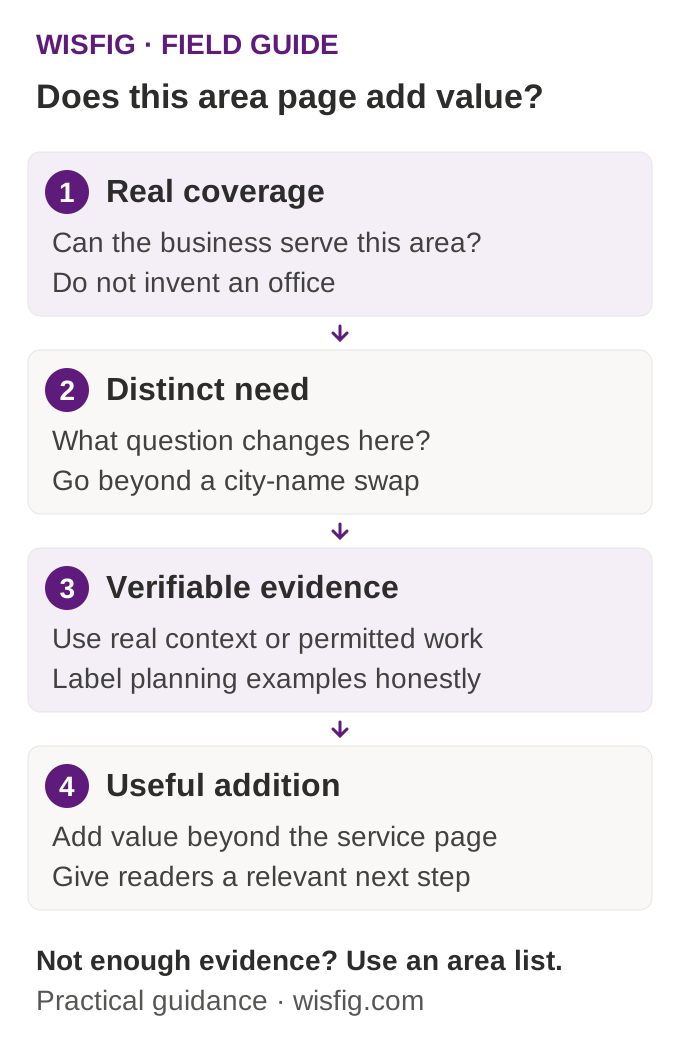
Apply the four-part evidence test
Confirm actual coverage. Identify a useful local question. Add verified context or permissioned business evidence. Then ask whether the page adds enough beyond the service parent to be worth maintaining. If not, keep the market in a clear area list instead.
The diagram is an editorial decision aid, not an algorithmic ranking formula.
A page-planning worksheet
- Customer question: what does this page help someone decide?
- Service parent: which main page contains the full offer?
- Local difference: what practical information belongs here and nowhere else?
- Evidence: what is sourced, what is business-confirmed, and what is only a hypothetical example?
- Links: which parent, area hub and useful guide should the reader reach next?
- Ownership: who updates the page when availability, hours or local information changes?
Review the set, not only one page
Read all proposed area pages together. Compare repeated paragraphs, headings and examples. Some shared contact and legal language is appropriate; repeated sales bodies with only the location changed are not. A similarity score can flag candidates, but a human review must judge whether the pages offer different value.
Keep one strong service explanation and link to it naturally from the area pages. Our location-page service, regional SEO approach and service-area hub show the intended relationship. Do not turn every city and every service into a separate URL by default.
Use the guide, then define the work
Browse the Wisfig guide library for related checklists. If you want help applying this to a real website, send the project details and the main service or customer journey you want to improve.